word document format incorr when transfer file format #
Recently, I received an urgent email with a .doc format attachment that required an immediate response like:
Dear 0x03ff:
…Please reply to me by today, otherwise, your application will not be considered.
Staff
Attachment: form.doc
Then later, I realized the document had two sections that required editing as:
...
Mode: *AM/FM/PM
...
...
Submit document *are / are not attached.
...

* Delete as appropriate
The Troubleshooting Journey #
Since I didn’t have a Windows PC available, I had to find a workaround on macOS. Here is everything I tried:
1. Microsoft 365 Web Editor #
Because the file was in the legacy .doc format, Microsoft Word Online could not edit it directly. It forced a conversion to .docx first. However, the new .docx fromat show inconsistent on the content.
2. Desktop Microsoft Word 2019 (macOS) #
Next, I tried opening it in my installed desktop version of Microsoft Word, but it gave me an account error stating I didn’t have permission to edit files.

I ran Microsoft AutoUpdate to fix it, but it refused to upgrade the app:
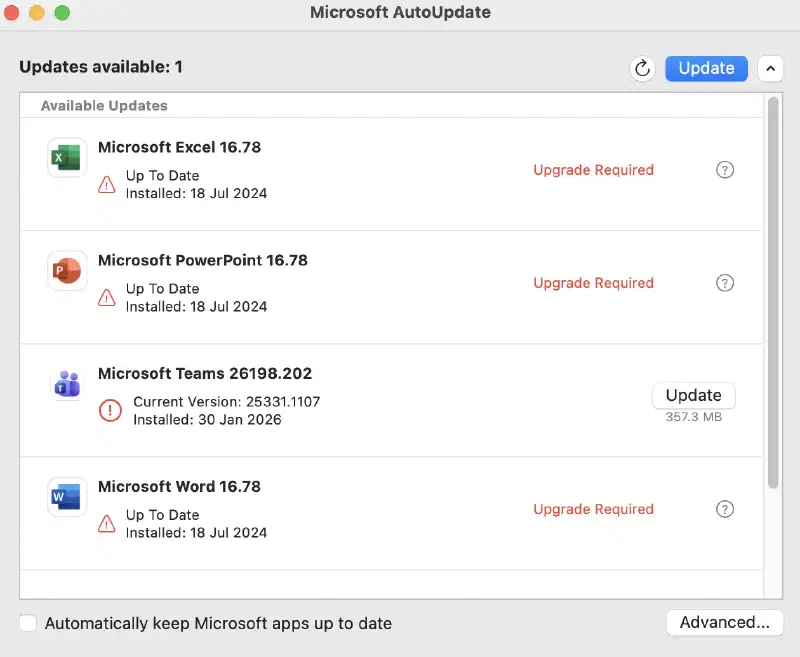
After researching Word version 16.78.3, I discovered that this corresponds to Office 2019 for Mac:
According to Microsoft Support, Office 2019 apps on newer macOS versions frequently drop editing capabilities.
I have version 16.78.3 on Mac OS and now that I have a new computer it will not allow edits.
The Articles, Windows Central, point out that Microsoft effectively sunset Office 2019 editing capabilities due to expired certificates and planned obsolescence.
3. Online PDF Editors #
I converted the .doc file to a .pdf locally to preserve the layout (which worked fine), but PDF files cannot easily be edited without distorting original content.
I tried several “free” online PDF editors. They let me make the edits visually, but locked the file behind a paywall/signup requirement when I tried to download the result.
Solution #
The Immediate Solution #
Uninstalling and reinstalling was an option, but with the clock ticking, I couldn’t risk wasting time on an uncertain fix. I walked over to the local public library. I previous realise their Windows PCs had fully licensed Microsoft Word installed, allowing me to make the edits, convert the document to PDF, and send it back just in time.
Testing LibreOffice as a Local Backup Solution #
After resolving the emergency, I wonder LibreOffice Writer, (bulid-in on lubuntu device), could handle this workflow locally so I’m prepared for next time.
I ran four tests on the .doc file:
| Method | Test Flow | Result formatting |
|---|---|---|
| Test 1 | Open .doc -> Edit -> Save as .docx | Incorrect |
| Test 2 | Open .doc -> Edit -> Export as .pdf | Incorrect |
| Test 3 | Convert .doc -> .pdf directly | Incorrect |
| Test 4 | Convert .doc -> Save as .docx -> Export to .pdf | Seem correct |
Conclusion #
It turns out LibreOffice can be most simple work: like edit two line code and do not rudy the formatting as intend.
Of course, that might only useful in this case, and Microsoft software still domination on the market. But next time Microsoft Office fail , other tools like LibreOffice might as emergency back-up plan.